
the short version
i've been building rs-capture-pipeline: a rust library that captures your screen and system audio on windows, encodes video with hardware when possible (nvenc), and hands you either files (mp4, h.264, wav) or encoded packets your app can forward to a streaming stack.
it's not a consumer app. it's not obs with a new skin. it's the capture-and-encode layer you'd embed inside a collab tool, a session recorder, a clip app, or anything that needs native capture without asking users to install a full broadcaster.
i ran an early benchmark in forza horizon 6 — same car, same route, two separate sessions: one recording with obs, one with this pipeline. the numbers are promising enough that i wanted to share them honestly, caveats included.
why this exists (when obs already exists)
obs is excellent at what it does: scenes, plugins, streaming, production workflows. millions of creators rely on it for good reason.
but when you're building a product, you often don't need obs-the-application. you need:
- reliable display capture on windows (without fragile screen-grab hacks)
- system audio that actually shows up in the recording
- hardware encoding that doesn't torch the cpu
- a library you can ship inside your installer, not a separate tool users configure
that's the gap i'm aiming at: less overhead, more embeddable, for teams who own the ux and the transport (webrtc, livekit, upload to s3, whatever).
i'm also dogfooding it for a collab-style project — but the pipeline is meant to stay independent. one module, many hosts.
what it actually is (without the jargon pile)
at a high level, the stack looks like this:
- capture — windows graphics capture (wgc) for the display, wasapi loopback for desktop audio
- convert — gpu path from captured frames toward nv12 / encoder-friendly layouts
- encode — nvenc when available, sensible fallbacks when not; aac or opus for audio
- output — write to disk or push
VideoPacket/AudioChunkstructs over channels for your app to consume
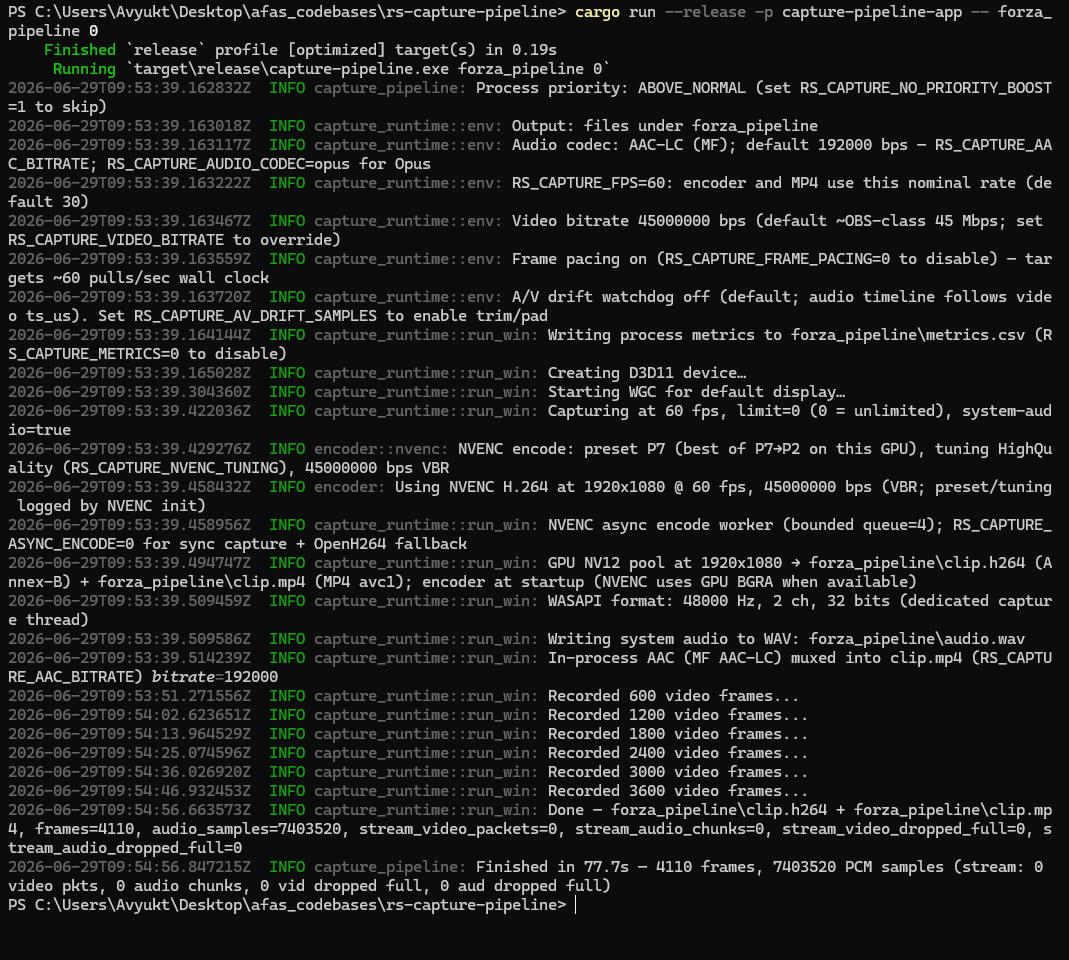
the public api lives in a crate called `capture-runtime`. the repo also ships a small cli (capture-pipeline) that's basically a reference host — proof that the library works, not the product itself.
rendering diagram…
how i ran the benchmark
i cared about two different questions:
- while recording, how much does capture hurt the game? (forza's built-in benchmark + on-screen overlay)
- what comes out in the recording file? (resolution, bitrate, audio)
rules i tried to follow
- one capture tool at a time — never obs and the pipeline simultaneously
- same resolution target (1080p), nvenc h.264, similar bitrate intent (~45 mbps)
- same-ish driving segment in forza (not a perfect lab test, but real gameplay)
- msi afterburner overlay on both runs for fps / gpu / cpu on screen
the pipeline also writes a `metrics.csv` during file recording (cpu and ram for the capture process only). obs gets its stats panel for dropped frames. i'll publish more on that workflow in a follow-up.
results: in-game performance (the part i care about most)
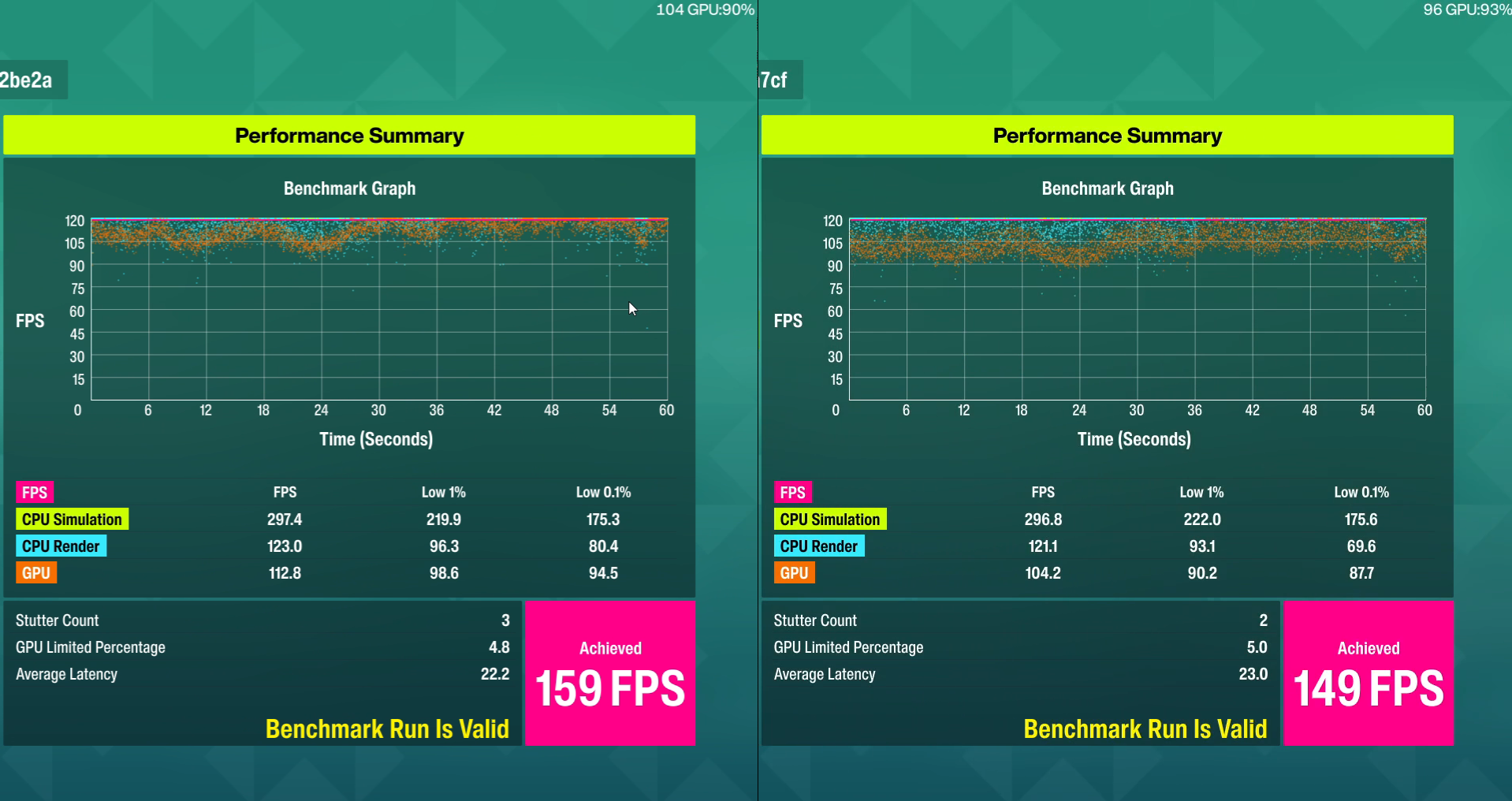
forza's performance summary compares cpu simulation, cpu render, and gpu frame rates — including 1% lows and 0.1% lows, which tell you how bad the worst moments get.
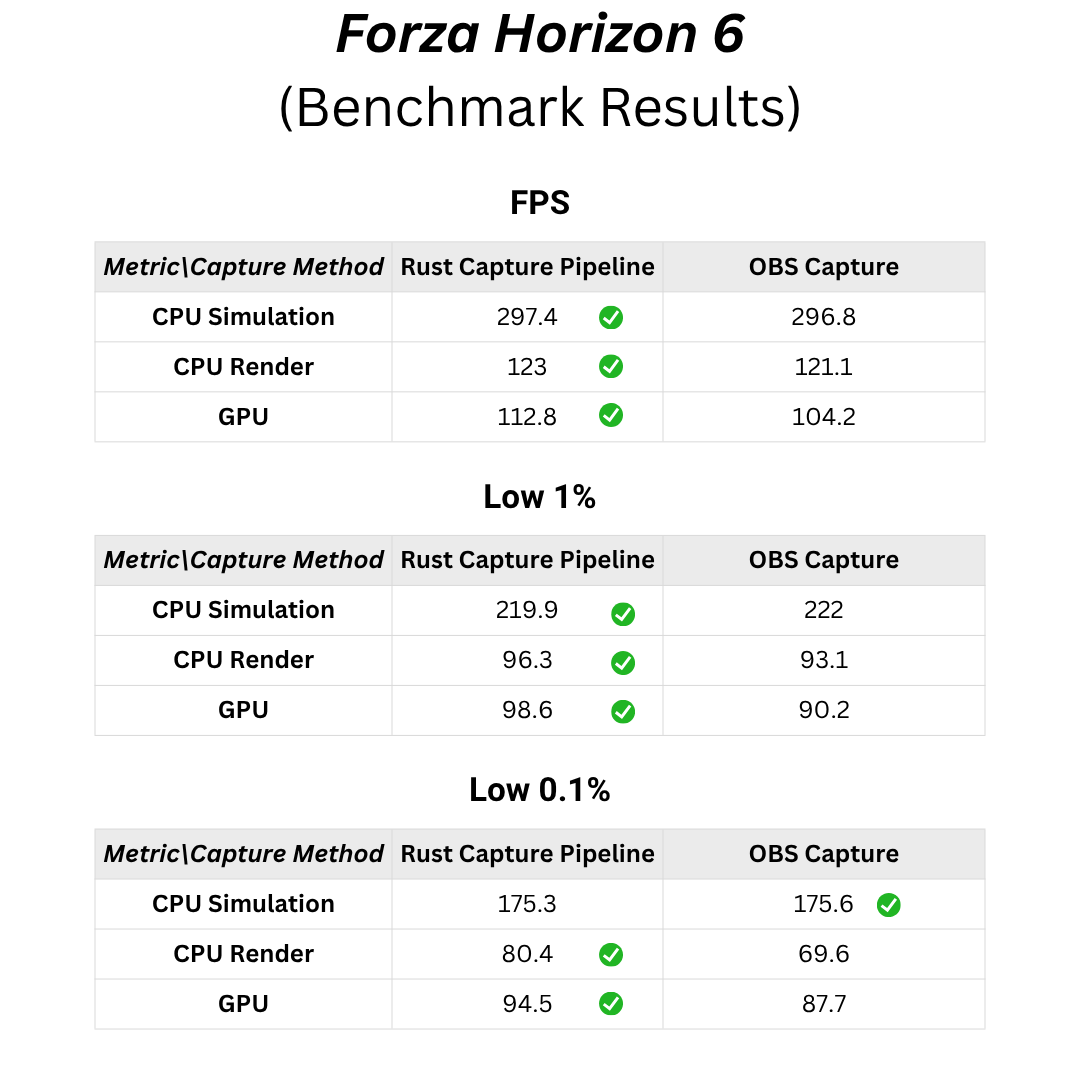
average fps (benchmark summary)
| metric | rust pipeline | obs |
|---|---|---|
| cpu simulation | 297.4 | 296.8 |
| cpu render | 123.0 | 121.1 |
| gpu | 112.8 | 104.2 |
the gpu line is the stand-out: roughly 8% higher gpu fps during the benchmark on the pipeline side. cpu simulation is basically a tie — the game logic isn't the story here. cpu render favors the pipeline modestly.
stability (1% and 0.1% lows)
| metric | rust pipeline | obs |
|---|---|---|
| gpu low 1% | 98.6 | 90.2 |
| gpu low 0.1% | 94.5 | 87.7 |
| cpu render low 0.1% | 80.4 | 69.6 |
higher lows mean fewer "ouch" frames when the scene gets busy. that's the difference you feel as a player — less micro-stutter while something is recording in the background.
achieved fps & overlay (real run)
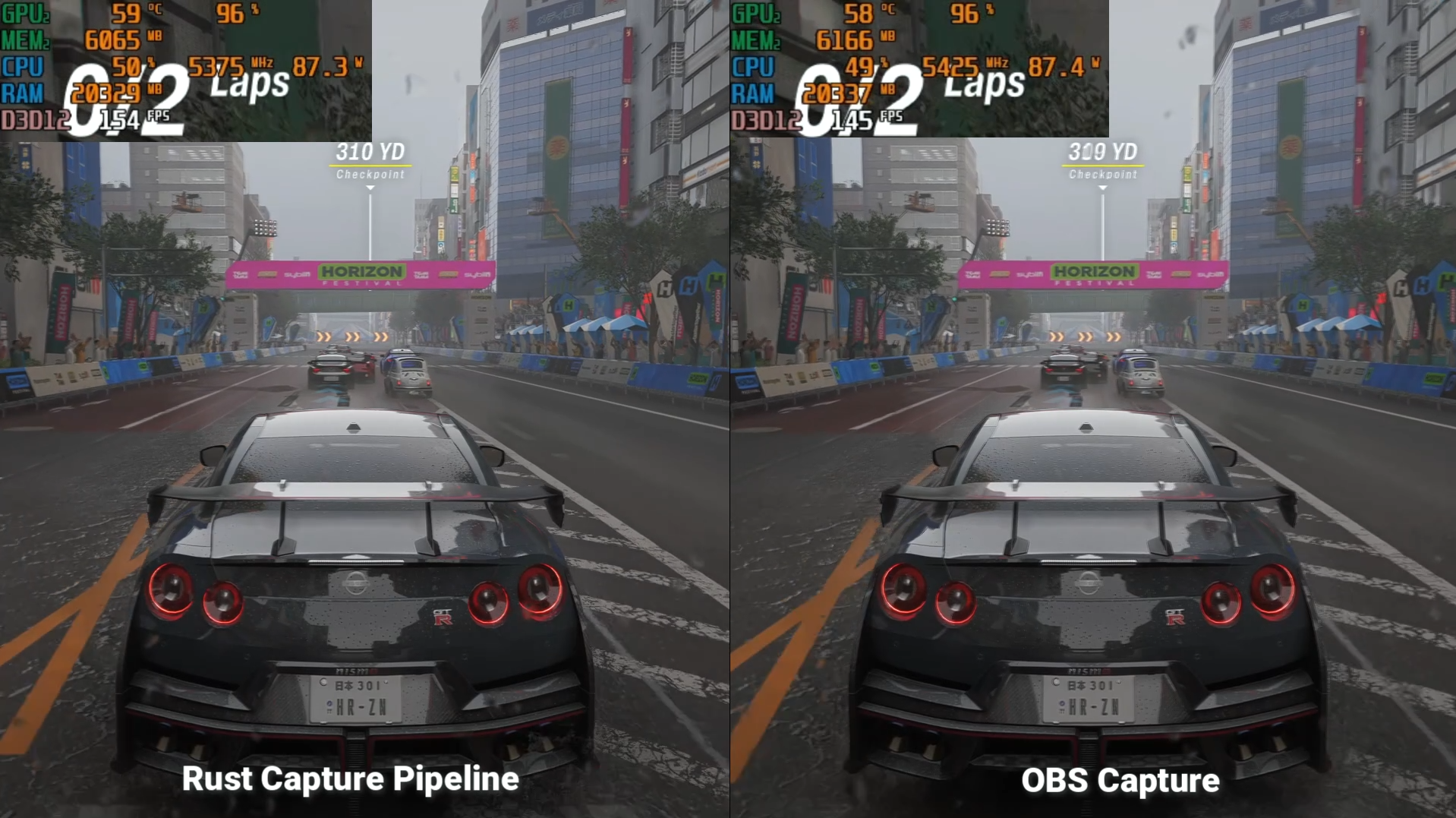
on the run i captured for the comparison video:
| rust pipeline | obs | |
|---|---|---|
| achieved fps | 159 | 149 |
| overlay (example) | ~104 fps @ ~90% gpu | ~96 fps @ ~93% gpu |
| average latency | 22.2 ms | 23.0 ms |
| stutter count | 3 | 2 |
so: higher fps with slightly lower gpu utilization on the overlay — capture isn't free, but the pipeline appears to tax the gpu a bit less for a better result. stutter count was marginally higher on my pipeline run (3 vs 2); i'd want more sessions before calling that significant.
results: system resources
| resource | rust pipeline | obs |
|---|---|---|
| gpu | ~97% | ~97% |
| cpu | ~53% | ~52% |
| memory | ~6150 mb | ~6290 mb |
gpu pegged on both — forza is still the main consumer. cpu is effectively the same. memory was ~140 mb lower on the pipeline run. not revolutionary, but it's the kind of small win that matters when your app is one of several heavy processes.
results: the recording files (quality vs frame rate)
| rust pipeline | obs | |
|---|---|---|
| resolution | 1920×1080 | 1920×1080 |
| video bitrate | ~39.5 mbps | ~32.4 mbps |
| frames in file | ~53.4 fps | 60 fps (hard cap) |
| audio | 192 kbps stereo, 48 khz | 190 kbps stereo, 48 khz |
here's the honest nuance:
- the pipeline recording carried more bits per second in the exported file — generally good for detail and fewer compression artifacts.
- obs locked 60 fps in the output. my file landed around 53 fps — that's a muxing / pacing / capture cadence tuning issue on my side, not something i'm proud of yet. in-game performance was better; the file frame rate still needs work for parity with a hard-capped 60 fps workflow.
i'll be tightening cfr-style output and frame pacing — the benchmark already showed the hard part (runtime overhead) is moving in the right direction.
who this is for (and who it isn't)
good fit
- teams building screen share or session recording into a desktop app
- streaming / rtc products that want a windows native publisher instead of browser-only capture
- clip or replay tools that need nvenc + system audio in-process
- developers who'd rather depend on a crate than maintain ffmpeg + gdigrab scripts forever
probably not a fit (and that's fine)
- solo streamers who want scenes, plugins, and a mature ecosystem — use obs
- anyone who needs macos/linux today — windows is where this lives right now
- anyone who wants webrtc in the box — you'll bridge transport in your host; this stops at encoded media
what's next
near-term roadmap for the module (not a consumer app):
- examples and integration docs for embedders (
record_to_dir,stream_stats,INTEGRATION.mdin the repo) - display / source selection apis
- tighter 60 fps file output to match benchmark-quality in-game performance
- optional bridges (livekit, rtmp) as separate crates or host code — keeping the core transport-agnostic
- longer soak tests (10+ minute sessions, drift, reconnect stories)
try it / get involved
the project is an embeddable rust workspace: `capture-runtime` is the api surface; the cli is a thin reference host.
if you're building something that needs native capture:
- i'd love to hear what api shape you'd need to actually integrate
- what trust bar you'd have (metrics, licensing, ci on windows, long-session reports)
- whether you'd pick this over obs, ffmpeg, or vendor sdks — and why
feedback welcome
this is early. the forza numbers made me optimistic; they didn't make me complacent. if you've shipped capture in production — or you've been burned by a/v sync, system audio on windows, or "why does screen share destroy fps" — tell me what i should measure next or what would make you trust a module like this.
drop a comment, open an issue, or reach out directly. brutal honesty beats polite silence.
thanks for reading. more technical deep-dives (wgc vs dxgi, audio pacing, downmix for surround wasapi) coming if people want them.